1. 问题:#
鸟哥解析 CentOS 7.x 的initramfs 档案内容 文章内容时, 主要疑问是为什么使用的是512bytes去算 “initramfs 档案的前置字元容量 ”的大小。
1
2
3
4
5
6
7
8
9
| # 1.先取得initramfs前面应该要去除的容量有多少才对!使用下列方式取得
[root@study ~]# mkdir /dev/shm/initramfs
[root@study ~]# cd /dev/shm/initramfs
[root@study initramfs]# cpio -i -d --no-absolute- filenames \
> -I /boot/initramfs-3.10.0-229.el7.x86_64.img
22 blocks
#这个重点就是在前面的字元占了几个block容量,每个block容量为512bytes,
# 因此,前面的部份就总共占了: 22 * 512 = 11264 个bytes 的意思!
# 每一个initramfs 档案的前置字元容量都不相同,所以需要先找出来去除才行!
|
2. 概念:#
initrd,initramfs的出现:硬件类型增多,要直接存储上的Linux kernel,需要硬件驱动, 而这些驱动由存放在文件系统根目录下, linux通过 虚拟档案系统(Initial RAM Disk或Initial RAM Filesystem) , 把这些启动引导需要的文档驱动加载到RAM中, 通过RAM上的init(systemd)加载我们实际存储上的(init)systemd, 完成后续的正常开机流程。
3. 处理过程:#
1. 解析方法:#
可以参考 上一篇文章。
2. initramfs格式:#
根据解析方法看cenos不同版本cenos6 , cenos7, initramfs格式也是不同。以cenos7 为例,使用skipcpio工具可以实现解析:
skipcpio.c 功能是跳过一个cpio文件和 \0 将结果输出到另外一个文件。
1
| centos7 可以使用 dracut 这个工具包进行处理 :which/usr/sbin/dracutvi dracut 发现是个脚本。
|
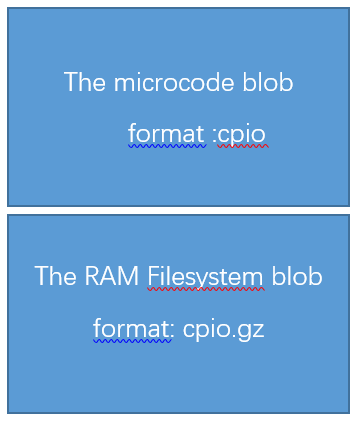
centos7 initramfs分为两部分:
1). microcode blob 部分#
1
| # The microcode blob is _before_ the initramfs blob, not after1594 if ! (1595 umask 0771596 cd "$early_cpio_dir/d"1597 find . -print0 | cpio -B --null $cpio_owner_root -H newc -o --quiet > "${DRACUT_TMPDIR}/initramfs.img"1598 ); then1599 dfatal "dracut: creation of $outfile failed"1600 exit 1
|
2). 具体的核心的文件部分#
先cpio+gzip格式 $compress是可以指定格式(gzip, bzip2, lzma, xz, lzo, lz4)的模式gzip
1
| 1606 if ! (1607 umask 0771608 cd "$initdir"1609 find . -print0 | cpio -B --null $cpio_owner_root -H newc -o --quiet | \1610 $compress >> "${DRACUT_TMPDIR}/initramfs.img";1611 ); then1612 dfatal "dracut: creation of $outfile failed"1613 exit 11614 fi
|
文件的两段内容都使用cpio进行的打包处理, 鸟哥使用512字节和cpio参数有关
man cpio
`-B’ Set the I/O block size to 5120 bytes. Initially the block size is 512 bytes.
3. 操作验证:#
修改了下dracut脚本中cpio 的参数调整下 cpio 中block size大小, 以 -C 参数为例:
`-C IO-SIZE, –io-size=IO-SIZE’
Set the I/O block size to IO-SIZE bytes.
1. 备份#
1
| cp /usr/sbin/dracut /usr/sbin/dracut.backupcp initramfs-3.10.0-862.el7.x86_64.img initramfs-3.10.0-862.el7.x86_64.img.backup
|
(不同内核文件名不同)
2. 修改#
1
| 1594 if ! (1595 umask 0771596 cd "$early_cpio_dir/d"1597 find . -print0 | cpio -C 4096 --null $cpio_owner_root -H newc -o --quiet > "${DRACUT_TMPD IR}/initramfs.img"1598 ); then1599 dfatal "dracut: creation of $outfile failed"1600 exit 1.......1609 find . -print0 | cpio -C 4096 --null $cpio_owner_root -H newc -o --quiet | \1610 $compress >> "${DRACUT_TMPDIR}/initramfs.img";
|
3. 执行#
1)生成镜像:#
1
| 如果要看日志可以将配置文件/etc/dracut.conf以下两行的注释取消;
|
1
| 7 logfile=/var/log/dracut.log8 fileloglvl=6
|
日志中会有详细处理步骤
2)计算microcode blob部分大小#
1
| cpio -C 4096 -i -d --no-absolute-filenames -I /boot/initramfs-3.10.0-862.el7.x86_64.img4 blocks输出 4 blocks, 计算获得 4*4096=16384 bytes
|
3) 跳过 microcode blob生成新文件#
1
| dd解析, gzip+ cpio 完成initramfs文件解压操作 。dd if=/boot/initramfs-3.10.0-862.el7.x86_64.img of=initramfs.gz bs=16384 skip=1
|
4)解压#
5)解包#
1
| cpio -i -d -H newc --no-absolute-filenames < initramfs88177 blocks
|
6) 查看#
1
| [root@centosgpt initramfs]# lsbin early_cpio init kernel lib64 root sbin sys tmp vardev etc initramfs lib proc run shutdown sysroot usr
|
作者文章中使用的block size是 cpio 程序的模式参数Initially the block size is 512 bytes, 本篇文章生成镜像依赖于工具dracut